Content Craft
Build a Process Carousel: A 6-Step Workflow from Outline to Post
A process carousel walks borrowers through a real sequence—how pre-approval works, what happens at closing, or the steps to refinance. This guide takes you from blank screen to published carousel using a repeatable workflow. By the end, you'll have a template you can use for any process and a carousel you're confident to share.
Step 1: Choose Your Process and Outline It
Pick a mortgage or real-estate process your borrowers ask about most. Write it out as a simple timeline: what happens first, second, third, and when does it end? Then count the steps. If you have 8 steps, your carousel is 8 slides plus a cover and CTA. If you have 12 steps, you might compress 2–3 into a single 'phase' to keep the carousel tight.
- List every step of the process in chronological order
- Estimate realistic timelines for each step (and say 'varies' if timing isn't fixed)
- Identify which steps borrowers worry about or misunderstand most
- Remove redundant steps—each slide must add something new
Step 2: Write Your Cover Slide Hook and Body Slides
Write a hook that sets up the process you're about to reveal (e.g., 'Here's your 45-day path from offer to keys'). Then write one clear sentence per slide that describes what happens at that step, who does it, and the borrower's role. Keep sentences short and simple. Assume your reader is on a phone and won't linger on dense text.
- Cover: Hook + context ('Here's your timeline for X')
- Slides 2+: One headline + 1–2 explanatory sentences per step
- Use action verbs: 'You submit', 'Lender orders', 'We schedule', 'Appraiser visits'
- Add timelines: 'This takes 3–5 business days' helps borrowers pace themselves
Step 3: Add Visuals or Design Elements
Pair each step with a visual. This can be a relevant photo (a person signing papers, a house exterior, a calendar), an icon that represents the step (a checkmark, a key, a document), or a bold colored block with the step number. Design doesn't need to be fancy—it needs to be consistent and clear. Use the same color scheme and font across all slides so the carousel feels like one story.
- Use a consistent design template across all slides (same colors, font sizes, layout)
- Add one visual per slide: a photo, icon, or color block (not both + text)
- Number the steps visually (slide 1 = 'Step 1', slide 2 = 'Step 2') so borrowers track progress
- Test on your phone—if text is hard to read, make it bigger or simplify
Step 4: Build Your Carousel File and Review for Compliance
Assemble your slides in a presentation tool or carousel-building app. Review every slide for compliance: no false guarantees, no specific rates or dollar amounts, and no claims about loan approval odds. Ask: 'Would a compliance officer flag this?' If yes, reword it. Then review for clarity: read each slide aloud to yourself. If you stumble or pause, rewrite it.
- Flag any language that implies a guarantee (remove 'guaranteed', 'ensure', 'promise')
- Replace specific rates or fees with 'varies based on your situation' or 'discuss with your lender'
- Ensure each step is accurate to your own lending process (don't guess)
- Proofread for typos—errors hurt credibility worse than missing a slide
Step 5: Write Your Caption and CTA
Your carousel is done; now write a caption that adds context without repeating the slides. The caption should answer 'Why did I make this?' and 'What should you do next?' Keep it 3–4 sentences. Your CTA is the close: 'Reply with your timeline', 'Save this for when you start shopping', or 'DM me if you're ready to talk.'
- Caption: Explain why this matters to borrowers (not to you)
- CTA: Name one action the borrower should take next
- Mention your contact info or how to reach you if not in your bio
- Avoid corporate jargon—use the voice of a helpful loan officer
Step 6: Publish, Track, and Update
Post your carousel on your channel(s) and watch what happens. Which slides got the most clicks? Did people finish the carousel or drop off at a certain point? If people dropped off at slide 4, consider whether that slide needs rewriting. Update your process carousel once a quarter or whenever your lending process changes—an outdated timeline loses credibility fast.
- Review platform insights: which slides got the most clicks or swipes?
- Re-share or repurpose the carousel seasonally (buying seasons, rate environments)
- Archive your carousel templates in a folder so you can rebuild them with new content
- Update timelines or details if lending processes change (e.g., appraisal timelines shift)
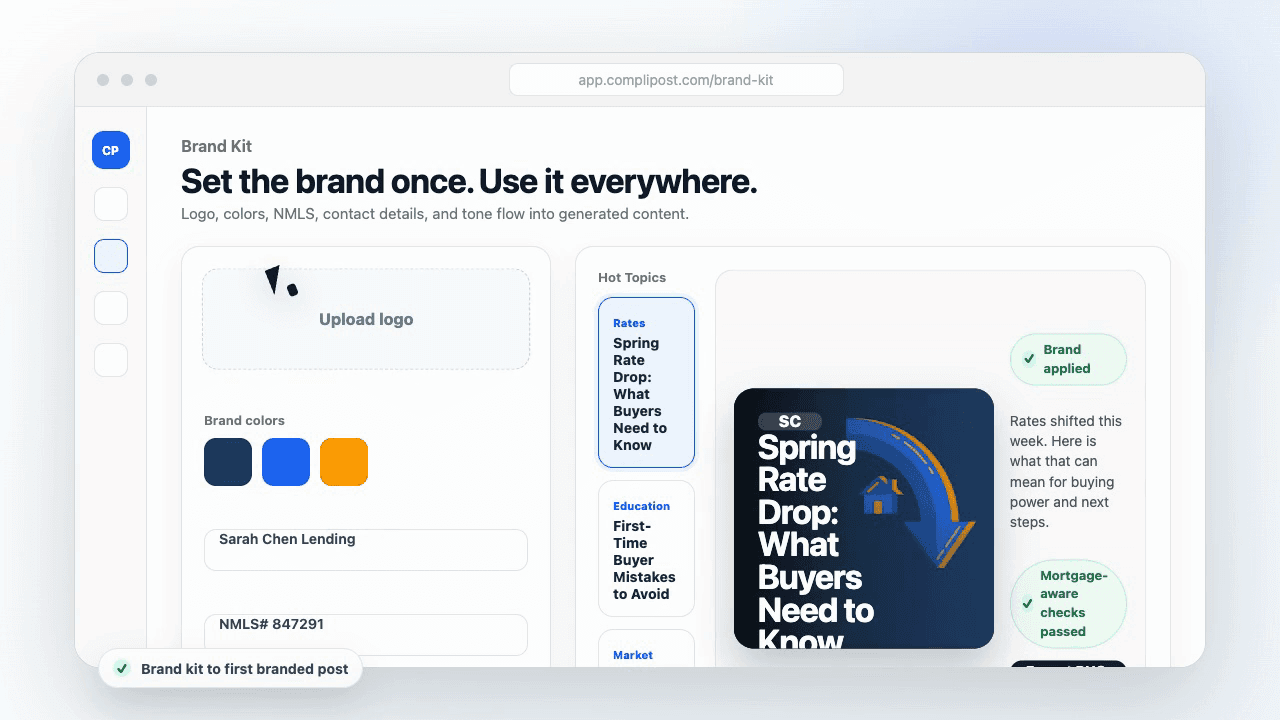
Product workflow
From blank page to export-ready mortgage content
- Start with a borrower topic
- Generate copy and a visual direction
- Review, save, and export the finished asset
These previews reflect the core CompliPost workflow: create, review, save, and export assets for use in your own channels.
Workflow comparison
| Content approach | What happens | Why it matters |
|---|---|---|
| Random posting | One-off ideas created when there is spare time | Inconsistent visibility and weak reuse |
| Template-only posting | Faster design but still requires rewriting and review | Helpful starting point, but not a full system |
| CompliPost workflow | Plan, generate, review, save, and export from one place | Better consistency with mortgage-aware review context |
| Done-for-you service | Someone else creates much of the content | Useful for some teams, but less control and less immediate reuse |
Who this guide helps
This guide is for loan officers working on solo loan officers who need a repeatable mortgage content workflow. The goal is to turn a broad mortgage topic into one borrower question, one useful takeaway, and one asset that can be reviewed before it is shared.
- You need content that sounds like a loan officer, not a generic brand account
- You want examples that can become captions, graphics, GIFs, or PDFs
- You need a clear place to review claims before export
- You want finished work saved for reuse, not lost in a chat thread
A practical workflow for this use case
Start with a narrow scenario, then move through planning, drafting, visual creation, review, and export. For process carousel workflow mortgage, that means the topic should be specific enough that a borrower or referral partner can immediately understand what decision the content helps with.
- Choose the borrower type, loan topic, or platform before generating copy
- Draft the caption and visual together so the asset feels cohesive
- Use the federal baseline review aid to flag claims and disclosure gaps
- Export the finished asset and save the post as a reusable starting point
What makes the content stronger
Strong mortgage content is usually specific, plain-spoken, and calm. It explains tradeoffs without pretending one answer fits every borrower. That is especially important on public social channels, where a short post can be interpreted without the full context of a loan conversation.
- Name the borrower question in the first line
- Explain one decision or tradeoff instead of covering everything
- Use examples without implying approval, savings, or rate outcomes
- End with a soft next step, checklist, or guide rather than pressure
Compliance-aware review notes
CompliPost should be treated as a review aid, not a compliance approval system. The public page, generated draft, graphic, and exported asset should all stay honest about that boundary.
- Review specific payment, APR, rate, savings, and qualification language
- Avoid “best,” “lowest,” “guaranteed,” “free,” and urgency claims unless approved
- Check NMLS, Equal Housing, company, and state-specific requirements
- Use company or legal review for anything outside the federal baseline
How this connects to the rest of CompliPost
A focused guide should leave you with a usable next step. After you understand the topic, you can turn it into a calendar slot, a reviewed social post, a downloadable guide, or a platform-specific version for the channel where your audience already spends time.
- Use the content calendar to turn the idea into a weekly plan
- Use the compliance page when claims or disclosures need a slower pass
- Use lead magnets when the topic deserves a deeper PDF guide
- Use platform pages to adapt the same idea for LinkedIn, Facebook, or Instagram
Recommended next steps
Instagram content hub
Create visual mortgage education for carousels, reels, and stories.
Carousel Structures That Convert
The timeline carousel is one structure; this guide walks you through the full build.
Carousel Cover-Slide Hooks
Start your process carousel with a hook that compels scrolls.
Graphic Design for Social Posts
Build consistent, readable carousel visuals.
Examples
FAQ
What if my process doesn't break into neat steps?+
Group similar actions into a single step or 'phase.' For example, if underwriting has 15 sub-steps but they all happen in parallel, call that phase 'Underwriting review (5–7 days)' and explain it happens behind the scenes. Keep the carousel focused on what the borrower needs to do or expect, not every bureaucratic detail.
Should I mention timelines if timelines vary widely?+
Yes, but be honest about it. 'Appraisal typically takes 5–7 business days, but can take longer in busy seasons' is true and helpful. Borrowers would rather know variability is possible than be shocked by a delay. Manage expectations rather than pretend certainty you don't have.
How do I decide if my process carousel is ready to post?+
Read it aloud. If it's clear to you and you'd feel confident sending it to a borrower, it's ready. Have a colleague or friend review it for clarity—if they can follow the steps without asking questions, you're done. Test it on your phone before posting; if text is hard to read or slides feel cramped, adjust the design.
Can I reuse the same process carousel for different products?+
Only if the process is truly identical. A conventional mortgage and an FHA mortgage have slightly different steps (FHA requires specific inspections), so they need separate carousels. Reusing a carousel for two different products will confuse borrowers. Build once per unique process.
What's the best way to stay current if my process changes?+
Set a reminder to audit your carousel library twice a year. When timelines shift (e.g., appraisal timelines lengthen in Q4) or your process changes, update the slides. Keep version notes ('Updated 2026-Q1') so you know when the carousel was last accurate. Out-of-date carousels hurt credibility.
Create mortgage content with a calmer workflow
CompliPost helps you plan, generate, review, save, and export useful mortgage content without pretending compliance or social distribution is automatic.
Start free