Platform planning
LinkedIn content calendar that builds referral relationships week after week
LinkedIn rewards fewer, longer posts over daily output. A loan officer LinkedIn calendar works best at three to four posts per week — with one educational anchor, one market context post, and at least one that speaks directly to referral partners.
LinkedIn cadence is different from Instagram cadence
LinkedIn's algorithm favors posts that generate extended engagement — saves, comments, and shares over time — rather than rapid posting volume. Three to four quality posts per week consistently outperforms seven short posts. Every loan officer LinkedIn calendar should reserve at least one slot per week for referral-partner-facing content: content that a realtor, financial planner, or CPA would want to share with a client.
- Monday: market context or professional observation (referral partner audience)
- Wednesday: borrower education or process explainer (borrower audience)
- Thursday: thought leadership or niche perspective (both audiences)
- Friday optional: team, community, or relationship post
LinkedIn's professional audience changes what you write
A 30-day scan of loan-officer social content found the strongest LinkedIn posts position the loan officer as an expert within a professional ecosystem — not just a service provider. Content that explains a decision framework, shares a market interpretation, or teaches something a referral partner can apply in their own client conversations builds more referral relationships than any direct-ask post.
Long-form content is LinkedIn's highest-leverage format
LinkedIn's native article feature and long-form posts (500–1,300 words) perform consistently better for loan officers than short captions. A well-argued explanation of how a loan product works for a self-employed borrower, or a clear summary of what this month's rate environment means for buyers who have been waiting, gives referral partners something they can share. That share reaches a new professional audience CompliPost cannot reach alone.
Compliance notes specific to LinkedIn
LinkedIn posts reach professionals who may scrutinize claims more closely than a general Instagram audience. Avoid implied rate predictions, approval promises language, or borrower outcome promises. A federal-baseline review aid is especially useful on LinkedIn where a compliance violation in a professional post can be screenshotted and circulated quickly.
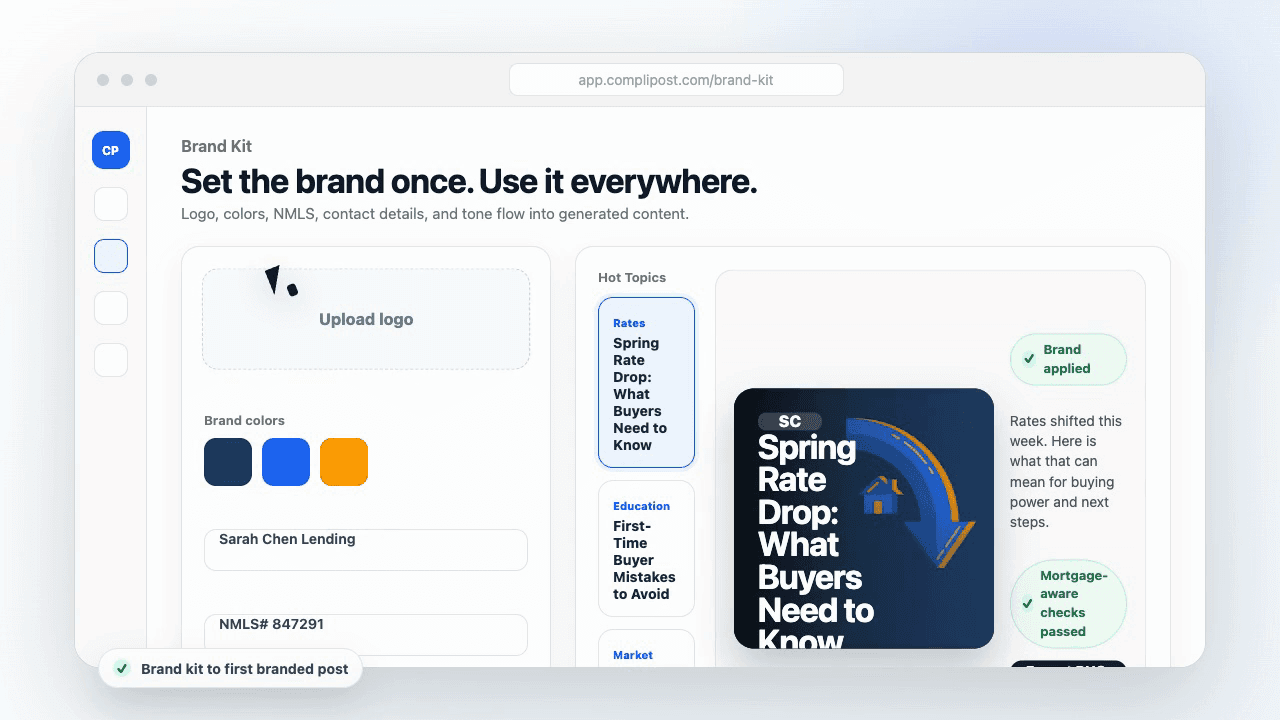
Product workflow
From blank page to export-ready mortgage content
- Start with a borrower topic
- Generate copy and a visual direction
- Review, save, and export the finished asset
These previews reflect the core CompliPost workflow: create, review, save, and export assets for use in your own channels.
Platform fit table
| Content job | Best format | Review note |
|---|---|---|
| Borrower education | Short explainer, carousel, or checklist | Keep claims general and educational |
| Referral partner trust | Process insight or local market context | Avoid borrower-identifying details |
| Lead magnet promotion | Guide preview plus soft CTA | Do not imply qualification or approval |
| Market update | Plain-language context | Avoid rate promises or panic language |
Who this guide helps
This guide is for loan officers working on professional audiences and referral partners on LinkedIn. The goal is to turn a broad mortgage topic into one borrower question, one useful takeaway, and one asset that can be reviewed before it is shared.
- You need content that sounds like a loan officer, not a generic brand account
- You want examples that can become captions, graphics, GIFs, or PDFs
- You need a clear place to review claims before export
- You want finished work saved for reuse, not lost in a chat thread
A practical workflow for this use case
Start with a narrow scenario, then move through planning, drafting, visual creation, review, and export. For LinkedIn content calendar loan officer, that means the topic should be specific enough that a borrower or referral partner can immediately understand what decision the content helps with.
- Choose the borrower type, loan topic, or platform before generating copy
- Draft the caption and visual together so the asset feels cohesive
- Use the federal baseline review aid to flag claims and disclosure gaps
- Export the finished asset and save the post as a reusable starting point
What makes the content stronger
Strong mortgage content is usually specific, plain-spoken, and calm. It explains tradeoffs without pretending one answer fits every borrower. That is especially important on public social channels, where a short post can be interpreted without the full context of a loan conversation.
- Name the borrower question in the first line
- Explain one decision or tradeoff instead of covering everything
- Use examples without implying approval, savings, or rate outcomes
- End with a soft next step, checklist, or guide rather than pressure
Compliance-aware review notes
CompliPost should be treated as a review aid, not a compliance approval system. The public page, generated draft, graphic, and exported asset should all stay honest about that boundary.
- Review specific payment, APR, rate, savings, and qualification language
- Avoid “best,” “lowest,” “guaranteed,” “free,” and urgency claims unless approved
- Check NMLS, Equal Housing, company, and state-specific requirements
- Use company or legal review for anything outside the federal baseline
How this connects to the rest of CompliPost
A focused guide should leave you with a usable next step. After you understand the topic, you can turn it into a calendar slot, a reviewed social post, a downloadable guide, or a platform-specific version for the channel where your audience already spends time.
- Use the content calendar to turn the idea into a weekly plan
- Use the compliance page when claims or disclosures need a slower pass
- Use lead magnets when the topic deserves a deeper PDF guide
- Use platform pages to adapt the same idea for LinkedIn, Facebook, or Instagram
Recommended next steps
LinkedIn content hub
Create professional posts for referral partners and business networks.
LinkedIn captions for loan officers
Write LinkedIn captions that open professional conversations.
Realtor partnership content ideas
Content angles that build referral partner trust on LinkedIn and beyond.
Mortgage content calendar
Plan a weekly rhythm so loan-type education posts on a schedule you can keep.
Examples
FAQ
How often should a loan officer post on LinkedIn?+
Three to four times per week is optimal for most loan officers. LinkedIn rewards engagement depth over posting frequency — one post that generates a 15-comment professional conversation is worth more than seven posts that get no replies.
What kind of content performs best on LinkedIn for loan officers?+
Educational posts that teach referral partners or borrowers something genuinely useful: market context posts, process explainers, niche-specific guides, and professional observations. Avoid promotional copy that reads like advertising — LinkedIn audiences disengage from hard sales quickly.
Should loan officers use LinkedIn articles or regular posts?+
Both. Regular posts reach your network quickly and perform well for shorter professional observations. LinkedIn articles are better for comprehensive guides (800+ words) on loan types, market context, or process explainers that referral partners might bookmark and share.
How do I build referral relationships through LinkedIn content?+
Create content that referral partners — realtors, CPAs, financial planners — can share with their own clients. A market context post a realtor can screenshot and text to a buyer, or a process guide a CPA can forward to a self-employed client, generates referral conversations organically.
Does CompliPost check LinkedIn posts for compliance?+
Yes. CompliPost's federal-baseline review aid flags risk signals in any text before export — professional posts with guarantee language, rate predictions, or casual phrases that cross into unauthorized advice are surfaced before you publish. The review is a risk-signal aid, not a final compliance approval.
Create mortgage content with a calmer workflow
CompliPost helps you plan, generate, review, save, and export useful mortgage content without pretending compliance or social distribution is automatic.
Start free