Content Inspiration
FHA vs. Conventional: 20 Carousel Post Ideas You Can Use Today
Carousel posts perform well on social because they're interactive and bite-sized. Here are 20 carousel concepts comparing FHA and conventional—each ready to be customized with your brand voice and audience. Pick, adapt, and post.
Carousel structure that works: frame it as 'Slide 1: Question, Slide 2-5: Answers'
The format that performs best: Slide 1 is a hook question ('FHA or conventional? Here's how to choose'). Slides 2-5 break down a single comparison (credit requirements, down payment, insurance, timeline). This keeps each carousel focused and prevents information overload. Each slide should have 1-2 sentences max and a visual (number, icon, or side-by-side comparison). End with a CTA ('Save this,' 'DM for a free consult,' 'Which would you choose?'). Test different carousels to see what your audience engages with most. Over time, you'll know which comparison angles resonate.
- Slide 1: Hook question or statement
- Slides 2-5: Break down one comparison into digestible pieces
- 1-2 sentences per slide; visuals (icons, numbers) support text
- End with CTA: save, DM, or question for engagement
- Test different angles; track engagement to see what resonates
20 carousel angles ready to customize
1. Credit Score Comparison (slide: 'FHA 580+, Conventional 620+'). 2. Down Payment (3.5% vs. 5-20%). 3. Monthly Payment (FHA lower rate vs. conventional PMI trade-off). 4. Timeline to Close (both similar, but appraisal risk differs). 5. Mortgage Insurance (MIP permanent vs. PMI removable). 6. Condo Approval Requirements. 7. Property Condition Appraisal (health/safety vs. value-focused). 8. Self-Employed Income Documentation. 9. Co-Borrower Rules. 10. Seller Perception (outdated bias addressed). 11. Refinance Options (FHA-to-conventional pathway). 12. Appraisal Failure Recovery (what happens next). 13. Gift Fund Rules. 14. Job Change Timeline. 15. DTI Flexibility. 16. Ownership Timeline (5yr vs. 30yr). 17. Rates & Current Market. 18. Loan Limits by Property Type. 19. FHA vs. Conventional Myths (myth-busting). 20. Decision Framework Quickstart. Each angle is teachable and shareable.
- Pick an angle that matches your audience's current questions
- Research current rates and limits to keep content timely
- Use your brand colors and fonts for consistency
- Include your logo, website, or contact info on final slide
- Post to Instagram, LinkedIn, and Facebook; re-purpose text for captions
Customization tips: make it yours without losing substance
Start with one carousel angle and adapt it. Change 'FHA' to 'The FHA loan' if it fits your voice. Add a personal touch: 'I recently helped a client...' or 'I see this question constantly...' Use specific numbers if you have current rate data (e.g., 'Today's FHA rate: 6.2%, Conventional: 6.45%'). But don't lie or project future rates—use current, verifiable info only. End slides with your strongest CTA based on what you want (leads, saves, comments, DMs). Test variations of the same angle and see which performs better. Consistency + variation = audience engagement.
- Adapt angles to your voice and audience; don't copy verbatim
- Use current rates and limits; refresh quarterly
- Add personal context or client stories for authenticity
- Strong CTA: 'Save this,' 'Share with someone buying,' 'DM for personalized numbers'
- Track performance; double down on angles that get saves and comments
Cadence and cross-posting: reach more borrowers with your carousel
Post one carousel per week if you're active. Spread them across the 20 angles so you're hitting different borrower questions and stages. Post to Instagram (Stories + Feed), Facebook, and LinkedIn—each platform allows carousels. Repurpose the text as a blog post, email, or thread on your website. Reference carousels in your other content: 'Swipe up for the full comparison' or 'Check out the carousel for the breakdown.' Link your CompliPost library or lead magnet to the carousel post so borrowers can save the comparison for later. Consistency builds authority; borrowers start to trust you as their source for FHA/conventional education.
- Post 1 carousel per week; rotate through 20 angles
- Cross-post to Instagram, Facebook, LinkedIn for reach
- Repurpose carousel text as blog posts or threads
- Link CompliPost library or lead magnet in carousel post
- Build trust through consistent, valuable education
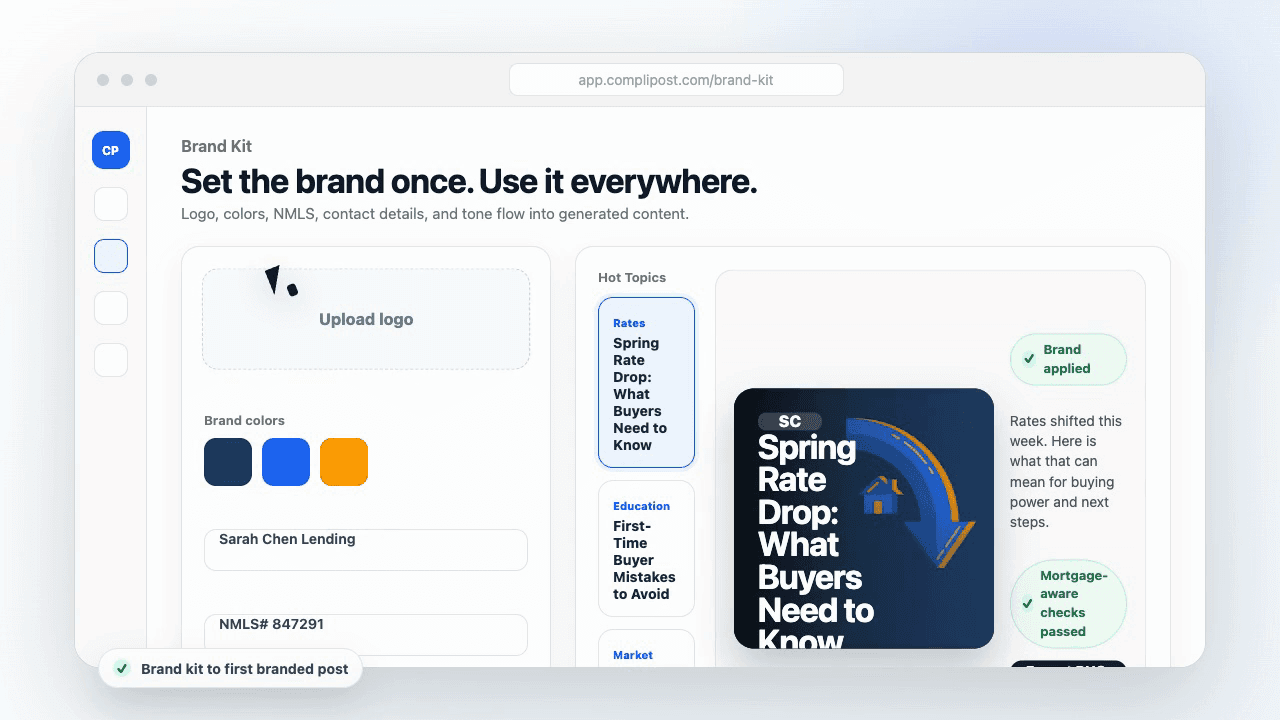
Product workflow
From blank page to export-ready mortgage content
- Start with a borrower topic
- Generate copy and a visual direction
- Review, save, and export the finished asset
These previews reflect the core CompliPost workflow: create, review, save, and export assets for use in your own channels.
Workflow comparison
| Content approach | What happens | Why it matters |
|---|---|---|
| Random posting | One-off ideas created when there is spare time | Inconsistent visibility and weak reuse |
| Template-only posting | Faster design but still requires rewriting and review | Helpful starting point, but not a full system |
| CompliPost workflow | Plan, generate, review, save, and export from one place | Better consistency with mortgage-aware review context |
| Done-for-you service | Someone else creates much of the content | Useful for some teams, but less control and less immediate reuse |
Who this guide helps
This guide is for loan officers working on solo loan officers who need a repeatable mortgage content workflow. The goal is to turn a broad mortgage topic into one borrower question, one useful takeaway, and one asset that can be reviewed before it is shared.
- You need content that sounds like a loan officer, not a generic brand account
- You want examples that can become captions, graphics, GIFs, or PDFs
- You need a clear place to review claims before export
- You want finished work saved for reuse, not lost in a chat thread
A practical workflow for this use case
Start with a narrow scenario, then move through planning, drafting, visual creation, review, and export. For FHA vs conventional carousel post ideas, that means the topic should be specific enough that a borrower or referral partner can immediately understand what decision the content helps with.
- Choose the borrower type, loan topic, or platform before generating copy
- Draft the caption and visual together so the asset feels cohesive
- Use the federal baseline review aid to flag claims and disclosure gaps
- Export the finished asset and save the post as a reusable starting point
What makes the content stronger
Strong mortgage content is usually specific, plain-spoken, and calm. It explains tradeoffs without pretending one answer fits every borrower. That is especially important on public social channels, where a short post can be interpreted without the full context of a loan conversation.
- Name the borrower question in the first line
- Explain one decision or tradeoff instead of covering everything
- Use examples without implying approval, savings, or rate outcomes
- End with a soft next step, checklist, or guide rather than pressure
Compliance-aware review notes
CompliPost should be treated as a review aid, not a compliance approval system. The public page, generated draft, graphic, and exported asset should all stay honest about that boundary.
- Review specific payment, APR, rate, savings, and qualification language
- Avoid “best,” “lowest,” “guaranteed,” “free,” and urgency claims unless approved
- Check NMLS, Equal Housing, company, and state-specific requirements
- Use company or legal review for anything outside the federal baseline
How this connects to the rest of CompliPost
A focused guide should leave you with a usable next step. After you understand the topic, you can turn it into a calendar slot, a reviewed social post, a downloadable guide, or a platform-specific version for the channel where your audience already spends time.
- Use the content calendar to turn the idea into a weekly plan
- Use the compliance page when claims or disclosures need a slower pass
- Use lead magnets when the topic deserves a deeper PDF guide
- Use platform pages to adapt the same idea for LinkedIn, Facebook, or Instagram
Recommended next steps
Instagram content hub
Create visual mortgage education for carousels, reels, and stories.
FHA vs. Conventional Explained Simply
Core facts to inform carousel angles and messaging.
FHA vs. Conventional: When to Mention Each & Messaging Strategy
Strategic timing for carousel posts across your borrower journey.
FHA vs. Conventional: Common Borrower Questions Answered
Questions to turn into carousel angles and content ideas.
Examples
FAQ
How long should each carousel be—5 slides, 10, more?+
5-8 slides is ideal. Longer carousels get fewer completions. Each slide should add value; no filler. Test length with your audience—some might prefer shorter (5), others longer (8). Check analytics to see where people drop off and optimize accordingly.
Should I post the same carousel multiple times or always fresh angles?+
Mix both. Post the same carousel 2-3 times spaced 3-6 months apart (new followers see it for the first time). Also introduce new angles so repeat followers see fresh content. Consistency wins but variety prevents staleness.
What's the best CTA for a FHA vs. conventional carousel?+
Depends on your goal. For awareness: 'Save this for later.' For leads: 'DM for your free comparison' or 'Comment your credit score—I'll tell you which program fits.' For engagement: 'Which would you choose?' or 'Share with someone buying.' Test different CTAs and see which gets the most interaction.
Can I use carousel templates or do I need custom design?+
Templates work fine if they fit your brand. Canva, Adobe Express, and many tools have carousel templates. Customize with your colors, fonts, and branding. Custom design is nice but templates are faster and still effective. The content matters more than the design.
How do I track carousel performance and know if they're working?+
Check platform analytics (saves, shares, comments). Carousels with high saves = valuable content borrowers want to reference. High comments = engagement and potential leads. Track which angles get the most saves and post more of those. You'll quickly see which comparisons your audience cares most about.
Create mortgage content with a calmer workflow
CompliPost helps you plan, generate, review, save, and export useful mortgage content without pretending compliance or social distribution is automatic.
Start free