Content strategy
Creating Effective Mortgage Education Videos as a Loan Officer
As a loan officer, creating engaging mortgage education videos can significantly enhance your digital presence and build trust with clients. Video content is not just about showcasing your services; it's about providing valuable insights into the mortgage process that can help potential borrowers make informed decisions. You don’t need a high-budget production setup to start making impactful videos. With just a smartphone, a ring light, and a lavalier microphone, you can produce professional-looking videos that captivate your audience. This guide will walk you through the essentials of video production, including equipment selection, setup techniques, filming tips, and basic editing skills. By mastering these elements, you can effectively communicate complex mortgage topics in an accessible and engaging way, making your content a valuable resource for both current and prospective clients.
Equipment Essentials for Loan Officers
Starting with video production doesn’t require expensive equipment. A smartphone with a decent camera can serve as your primary recording device. To enhance video quality, incorporate a ring light, which is effective in eliminating shadows and providing even lighting. This basic lighting tool can be purchased for around $30 and is essential for ensuring your videos look professional. Pair your smartphone with a lavalier microphone, also available for approximately $30, to capture clear audio. This small investment can significantly improve the sound quality of your videos, making your content more engaging. Together, these tools provide a foundation for producing high-quality videos without the need for a large budget.
- Smartphone: Primary recording device
- Ring light: Eliminates shadows, cost-effective
- Lavalier microphone: Clear audio, budget-friendly
Setting Up Your Video Production Space
Creating an effective video production setup is crucial for delivering clear and professional content. Position your ring light in front of you to ensure your face is well-lit and free from shadows. Attach the lavalier microphone to your shirt to secure optimal audio quality. Choose a quiet room with minimal background noise to enhance the clarity of your content. A simple, clean backdrop such as a blank wall or an organized bookshelf can serve as a neutral background that doesn’t distract from your message. By minimizing distractions, you help viewers focus on the valuable information you're providing.
- Position ring light directly in front
- Clip microphone to shirt for strong audio
- Select quiet room with simple backdrop
Filming Techniques for Engaging Videos
When filming, start by outlining your key talking points to keep your content focused and coherent. Unlike a rigid script, an outline allows for a natural and conversational delivery, which can be more engaging for viewers. Aim to complete your video in one take, but don’t worry if mistakes occur. Simply pause and restart from the last complete sentence, as these can be easily edited out later. Consistency in your presentation style builds familiarity and trust with your audience. As you film, maintain eye contact with the camera to create a personal connection with viewers, enhancing their engagement with your content.
- Outline talking points, avoid rigid scripts
- One-take filming; edit out mistakes
- Maintain eye contact with camera
Basic Editing for Polished Video Content
Editing is a crucial step in refining your video content, ensuring it is polished and professional. Free editing tools like CapCut or iMovie offer user-friendly interfaces that make trimming clips and removing errors straightforward. Focus on cutting out long pauses and mistakes to maintain a smooth flow. Enhance your video with text overlays to highlight key points, making the information more digestible for viewers. Avoid complex effects that can distract from your main message. By keeping your editing simple, you ensure that your content remains clear and focused, providing maximum value to your audience.
- Use CapCut or iMovie for editing
- Trim pauses, remove errors
- Add text overlays for emphasis
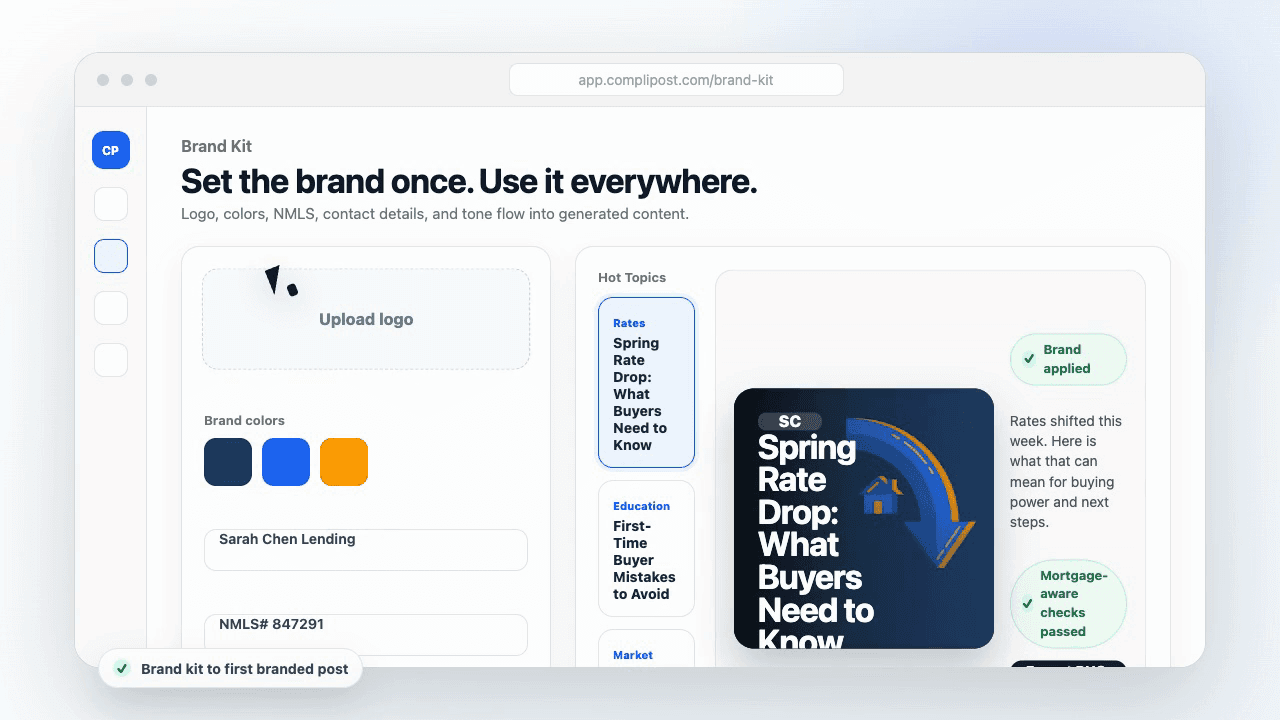
Product workflow
From blank page to export-ready mortgage content
- Start with a borrower topic
- Generate copy and a visual direction
- Review, save, and export the finished asset
These previews reflect the core CompliPost workflow: create, review, save, and export assets for use in your own channels.
Workflow comparison
| Content approach | What happens | Why it matters |
|---|---|---|
| Random posting | One-off ideas created when there is spare time | Inconsistent visibility and weak reuse |
| Template-only posting | Faster design but still requires rewriting and review | Helpful starting point, but not a full system |
| CompliPost workflow | Plan, generate, review, save, and export from one place | Better consistency with mortgage-aware review context |
| Done-for-you service | Someone else creates much of the content | Useful for some teams, but less control and less immediate reuse |
Who this guide helps
This guide is for loan officers working on solo loan officers who need a repeatable mortgage content workflow. The goal is to turn a broad mortgage topic into one borrower question, one useful takeaway, and one asset that can be reviewed before it is shared.
- You need content that sounds like a loan officer, not a generic brand account
- You want examples that can become captions, graphics, GIFs, or PDFs
- You need a clear place to review claims before export
- You want finished work saved for reuse, not lost in a chat thread
A practical workflow for this use case
Start with a narrow scenario, then move through planning, drafting, visual creation, review, and export. For video production loan officers, that means the topic should be specific enough that a borrower or referral partner can immediately understand what decision the content helps with.
- Choose the borrower type, loan topic, or platform before generating copy
- Draft the caption and visual together so the asset feels cohesive
- Use the federal baseline review aid to flag claims and disclosure gaps
- Export the finished asset and save the post as a reusable starting point
What makes the content stronger
Strong mortgage content is usually specific, plain-spoken, and calm. It explains tradeoffs without pretending one answer fits every borrower. That is especially important on public social channels, where a short post can be interpreted without the full context of a loan conversation.
- Name the borrower question in the first line
- Explain one decision or tradeoff instead of covering everything
- Use examples without implying approval, savings, or rate outcomes
- End with a soft next step, checklist, or guide rather than pressure
Compliance-aware review notes
CompliPost should be treated as a review aid, not a compliance approval system. The public page, generated draft, graphic, and exported asset should all stay honest about that boundary.
- Review specific payment, APR, rate, savings, and qualification language
- Avoid “best,” “lowest,” “guaranteed,” “free,” and urgency claims unless approved
- Check NMLS, Equal Housing, company, and state-specific requirements
- Use company or legal review for anything outside the federal baseline
How this connects to the rest of CompliPost
A focused guide should leave you with a usable next step. After you understand the topic, you can turn it into a calendar slot, a reviewed social post, a downloadable guide, or a platform-specific version for the channel where your audience already spends time.
- Use the content calendar to turn the idea into a weekly plan
- Use the compliance page when claims or disclosures need a slower pass
- Use lead magnets when the topic deserves a deeper PDF guide
- Use platform pages to adapt the same idea for LinkedIn, Facebook, or Instagram
Recommended next steps
Mortgage social media content
See the cross-platform content workflow for loan officers.
Mortgage content calendar
Plan a weekly rhythm of useful borrower and referral-partner posts.
Calendar generator
Turn one mortgage topic into a practical weekly content plan.
Compliance checklist tool
Check common mortgage marketing risk signals before export.
Examples
FAQ
What equipment do I need for video production?+
To begin video production, you need a smartphone, a ring light, and a lavalier microphone. These tools are cost-effective and sufficient for creating professional-looking videos. A quiet room with a non-distracting background is also recommended to maintain video quality and clarity. The practical move is to keep the answer educational, mention that details vary by borrower profile and lender guidelines, and invite the reader to ask for a personal review instead of implying a certain result.
How long should mortgage videos be?+
Mortgage videos should be concise and focused. For social media, aim for 1-3 minute videos to capture attention quickly. For more in-depth educational content, videos can be 5-10 minutes long, allowing you to cover topics thoroughly while keeping the viewer engaged. The practical move is to keep the answer educational, mention that details vary by borrower profile and lender guidelines, and invite the reader to ask for a personal review instead of implying a certain result.
How can I make my videos engaging?+
Engagement is key in video content. Use an outline to keep your delivery natural and conversational. Maintain eye contact with the camera to create a connection with your audience. Incorporate text overlays for key points and ensure your audio is clear and free from distractions.
What editing tools should I use?+
Free tools like CapCut and iMovie are ideal for beginners. They offer simple interfaces for trimming clips, removing mistakes, and adding text overlays. Avoid complex effects and focus on creating a clear and polished final product. These tools help streamline the editing process without overwhelming you.
Create mortgage content with a calmer workflow
CompliPost helps you plan, generate, review, save, and export useful mortgage content without pretending compliance or social distribution is automatic.
Start free