Content Strategy
Using Hashtags to Expand Your Mortgage Audience
Loan officers can leverage hashtags to broaden their reach and connect with potential borrowers interested in mortgage topics. Understanding the nuances of hashtag usage across different platforms can significantly enhance engagement. On Instagram and TikTok, using a robust mix of 20-30 specific hashtags can increase visibility, while LinkedIn and Twitter require a more subtle approach with fewer hashtags to maintain professionalism. This guide will walk you through the essentials of crafting a hashtag strategy that aligns with your goals and resonates with your audience, ensuring that your content is both discoverable and engaging.
Research Hashtags in Your Niche
Effective hashtag strategies begin with thorough research. Generic hashtags like #mortgage can be overly saturated, with millions of posts making it difficult for your content to stand out. Instead, focus on niche-specific hashtags such as #FirstTimeHomeBuyer or #RefinanceReady, which typically have between 50,000 and 200,000 posts. These hashtags are not only more targeted but also tend to foster higher engagement rates as they connect you with a more interested audience. Utilize tools like Hashtag Hero or All Hashtags to identify these specific terms and evaluate their performance over time.
- #FirstTimeHomeBuyer
- #FHALoans
- #RefinanceReady
Understand Platform-Specific Hashtag Rules
Different social media platforms have unique hashtag rules that can affect the visibility of your posts. On Instagram and TikTok, the algorithm favors content with a comprehensive set of hashtags. Aim for 20-30 relevant hashtags to maximize reach. Conversely, LinkedIn and Twitter are more conservative spaces where excessive hashtags might appear unprofessional. Limit your use to 1-3 on LinkedIn and avoid hashtags altogether on Twitter, or use only one to maintain a clean and credible appearance. Adapting your strategy to each platform's norms will help maintain your professional image while enhancing engagement.
- 20-30 hashtags on Instagram/TikTok
- 1-3 hashtags on LinkedIn
- 0-1 hashtag on Twitter
Combine Evergreen and Trending Hashtags
A balanced hashtag strategy incorporates both evergreen and trending hashtags. Evergreen hashtags, such as #MortgageLoanOfficer and #PreApproval, provide consistent engagement as they remain relevant over time. Trending hashtags, like #RatesDropped or #BuyingInSpring, can capture timely interest and boost your reach during specific periods. By mixing these types, you can attract a steady audience while taking advantage of current trends. Regularly update your list of trending hashtags to align with seasonal shifts and mortgage industry changes, ensuring your content remains fresh and engaging. hashtag strategy mortgage professionals compliance note: avoid exact terms, certainty language, and rushed decisions. hashtag strategy mortgage professionals works better as education when it explains a tradeoff and invites a specific question.
- #MortgageLoanOfficer
- #PreApproval
- #RatesDropped
Monitor and Adjust Your Hashtag Strategy
An effective hashtag strategy is not static. Continuously monitor the performance of your hashtags using analytics tools to understand which ones drive the most engagement. Pay attention to changes in platform algorithms and industry trends that might influence hashtag effectiveness. Adjust your strategy accordingly to maintain relevance and maximize reach. Regularly test new hashtags while discarding those that no longer perform well. This dynamic approach ensures that your content remains visible and impactful, helping you connect with a broader audience interested in mortgage solutions. hashtag strategy mortgage professionals reuse plan: make one caption, one carousel point, one email follow-up, and one saved template. hashtag strategy mortgage professionals then supports social, partner, and nurture workflows.
- Use analytics tools
- Test and discard underperforming hashtags
- Adapt to industry trends
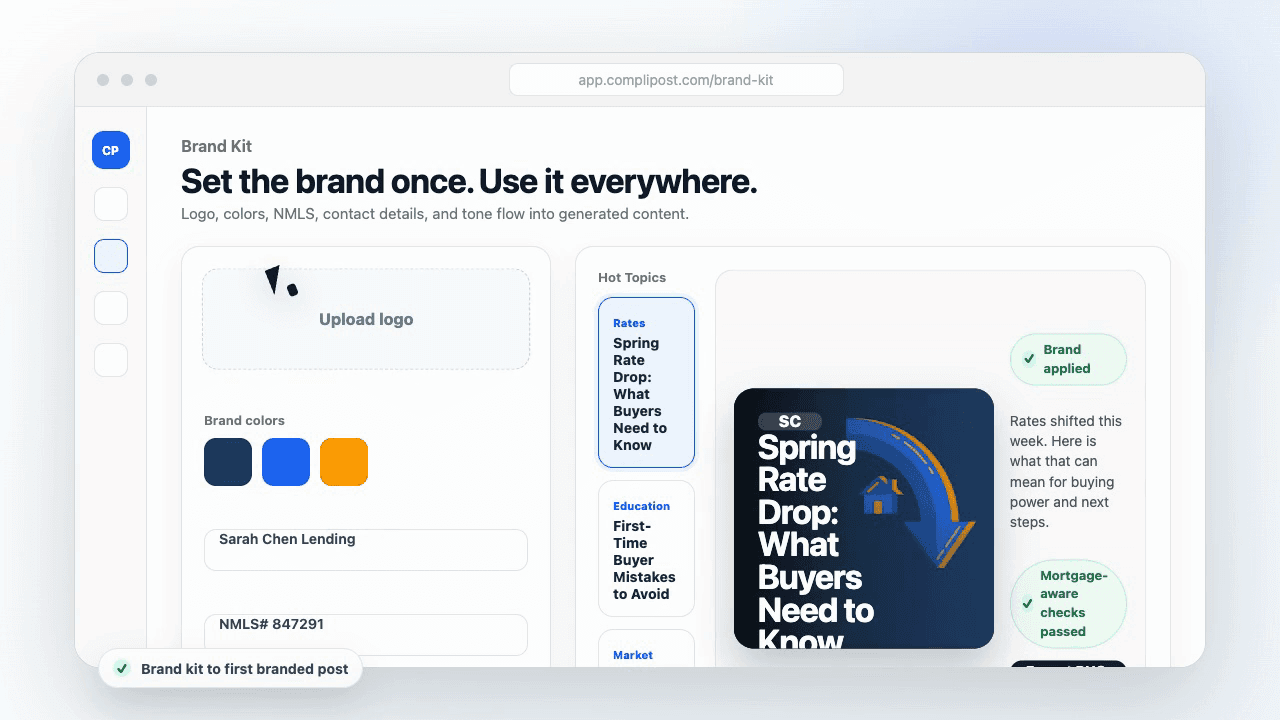
Product workflow
From blank page to export-ready mortgage content
- Start with a borrower topic
- Generate copy and a visual direction
- Review, save, and export the finished asset
These previews reflect the core CompliPost workflow: create, review, save, and export assets for use in your own channels.
Workflow comparison
| Content approach | What happens | Why it matters |
|---|---|---|
| Random posting | One-off ideas created when there is spare time | Inconsistent visibility and weak reuse |
| Template-only posting | Faster design but still requires rewriting and review | Helpful starting point, but not a full system |
| CompliPost workflow | Plan, generate, review, save, and export from one place | Better consistency with mortgage-aware review context |
| Done-for-you service | Someone else creates much of the content | Useful for some teams, but less control and less immediate reuse |
Who this guide helps
This guide is for loan officers working on solo loan officers who need a repeatable mortgage content workflow. The goal is to turn a broad mortgage topic into one borrower question, one useful takeaway, and one asset that can be reviewed before it is shared.
- You need content that sounds like a loan officer, not a generic brand account
- You want examples that can become captions, graphics, GIFs, or PDFs
- You need a clear place to review claims before export
- You want finished work saved for reuse, not lost in a chat thread
A practical workflow for this use case
Start with a narrow scenario, then move through planning, drafting, visual creation, review, and export. For hashtag strategy mortgage professionals, that means the topic should be specific enough that a borrower or referral partner can immediately understand what decision the content helps with.
- Choose the borrower type, loan topic, or platform before generating copy
- Draft the caption and visual together so the asset feels cohesive
- Use the federal baseline review aid to flag claims and disclosure gaps
- Export the finished asset and save the post as a reusable starting point
What makes the content stronger
Strong mortgage content is usually specific, plain-spoken, and calm. It explains tradeoffs without pretending one answer fits every borrower. That is especially important on public social channels, where a short post can be interpreted without the full context of a loan conversation.
- Name the borrower question in the first line
- Explain one decision or tradeoff instead of covering everything
- Use examples without implying approval, savings, or rate outcomes
- End with a soft next step, checklist, or guide rather than pressure
Compliance-aware review notes
CompliPost should be treated as a review aid, not a compliance approval system. The public page, generated draft, graphic, and exported asset should all stay honest about that boundary.
- Review specific payment, APR, rate, savings, and qualification language
- Avoid “best,” “lowest,” “guaranteed,” “free,” and urgency claims unless approved
- Check NMLS, Equal Housing, company, and state-specific requirements
- Use company or legal review for anything outside the federal baseline
How this connects to the rest of CompliPost
A focused guide should leave you with a usable next step. After you understand the topic, you can turn it into a calendar slot, a reviewed social post, a downloadable guide, or a platform-specific version for the channel where your audience already spends time.
- Use the content calendar to turn the idea into a weekly plan
- Use the compliance page when claims or disclosures need a slower pass
- Use lead magnets when the topic deserves a deeper PDF guide
- Use platform pages to adapt the same idea for LinkedIn, Facebook, or Instagram
Recommended next steps
Mortgage social media content
See the cross-platform content workflow for loan officers.
Mortgage content calendar
Plan a weekly rhythm of useful borrower and referral-partner posts.
Calendar generator
Turn one mortgage topic into a practical weekly content plan.
Compliance checklist tool
Check common mortgage marketing risk signals before export.
Examples
FAQ
How do I find effective hashtags?+
Finding effective hashtags involves research and analysis. Use tools like Hashtag Hero or All Hashtags to discover hashtags that align with your content and audience. You can also manually search on platforms like Instagram and TikTok to gauge their popularity and engagement levels. By consistently evaluating the performance of your chosen hashtags, you can refine your strategy to enhance visibility and engagement.
Can using too many hashtags hurt my content?+
While hashtags are beneficial for discoverability, using too many on certain platforms can appear unprofessional. On LinkedIn and Twitter, a cluttered hashtag approach might detract from your message. It's crucial to balance your use of hashtags in a way that complements your content without overwhelming it. By tailoring your hashtag strategy to each platform's culture, you can maintain a professional image while maximizing reach.
What is the difference between evergreen and trending hashtags?+
Evergreen hashtags remain relevant over time, providing consistent engagement regardless of current events. They are ideal for building a stable audience base. Trending hashtags, on the other hand, gain traction based on current events or seasonal trends. They can boost your visibility temporarily during peak interest periods. A strategic mix of both types can enhance your content's reach and relevance.
How often should I update my hashtag strategy?+
Regular updates to your hashtag strategy are essential for staying relevant and effective. Monitor the performance of your hashtags using analytics tools and adjust them as needed based on engagement trends and platform changes. Aim to review and refresh your strategy every few months, or more frequently if there are significant shifts in the mortgage industry or social media algorithms.
Create mortgage content with a calmer workflow
CompliPost helps you plan, generate, review, save, and export useful mortgage content without pretending compliance or social distribution is automatic.
Start free