Platform content
Pinterest content that keeps working long after you post it
Pinterest is a visual search engine, not a social feed. A well-crafted infographic about down payment requirements can surface in buyer search results for two years or more. For loan officers, that shelf life changes the math: invest once in quality educational pins and earn search traffic that compounds without a daily posting grind.
Pinterest is a search engine, not a social feed
Every other platform ranks content by recency. Pinterest ranks by relevance to what a buyer is actively searching: "how much down payment do I need," "steps to buying a house," "what is PMI." That changes the entire strategy. A pin posted today can surface as a top result eighteen months from now if it is well-titled, visually clear, and linked to a useful destination. Loan officers who understand this stop chasing posting frequency and start investing in pin quality — because a great educational infographic earns returns long after the moment it goes live.
- Optimize pin titles for the exact phrases buyers type, not hashtags
- A quality infographic can drive search traffic for 18–24 months
- Pin descriptions should read as search-friendly summaries, not captions
- Link every pin to a destination worth visiting: your website, a checklist, a contact page
Build boards as buyer resource hubs
Pinterest boards are the architecture of your content library. Organize them the way a first-time buyer thinks — not by your product lineup, but by the questions they have at each stage of the process. A board called "First-Time Buyer Checklist" or "Understanding Mortgage Costs" becomes a destination buyers return to and share. When boards are structured well, a buyer who pins one infographic often scrolls through the entire board, consuming six or eight pieces of your content in a single session. That depth of engagement is not available on any other platform in your toolkit.
- "First-Time Buyer Resources" — checklist pins, process guides, FAQs
- "Understanding Your Mortgage" — PMI, escrow, closing costs, rate types explainers
- "Home Buying Process" — step-by-step visual timelines
- "Mortgage Myths Debunked" — fact vs. fiction infographics
- "Homeownership Tips" — post-close content that earns long-term saves
Pin formats that actually work for mortgage content
Checklist-style infographics are the workhorse of mortgage Pinterest. A vertical infographic titled "5 things to do before applying for a mortgage" is easy to scan, easy to save, and easy to share. Step-by-step visual guides work for process content: preapproval to closing, what happens at the appraisal, how escrow accounts work. Quote graphics and single-stat visuals round out the mix and require far less production time. Video pins are growing in the home-planning category and can adapt your existing short-form explainers. What does not work: lifestyle content optimized for Instagram, promotional graphics that lead with your headshot and phone number, or pins without a useful destination link.
- Vertical infographics (2:3 ratio): checklist-style, step-by-step guides
- Single-stat or quote graphics: fast to produce, high save rate
- Video pins: short explainers repurposed from other platforms
- Avoid: promotional headshot graphics, rate-heavy content, horizontal formats
The compliance angle: TILA trigger terms and evergreen framing
Pinterest's long content shelf life creates a specific compliance consideration. A pin that includes a rate or APR when it is published may be outdated — and potentially misleading — six months later when a buyer finds it in search results. The practical solution is to write all pins using evergreen framing: "current rates vary — get a personalized quote" rather than any specific number. This is also the safest approach under TILA trigger-term rules, which require additional disclosures the moment a specific rate or loan term appears. CompliPost's federal-baseline review aid flags rate language and other risk signals before you export; treat it as a pre-post gut check, not a guarantee of approval.
- Avoid specific rates or APRs in pins — content stays live for months or years
- Use "current rates vary" framing; invite borrowers to get a personalized quote
- TILA trigger terms require additional disclosures — easiest to avoid them entirely
- CompliPost's review aid flags risk signals before export as a federal-baseline check
How CompliPost fits into a Pinterest workflow
The effort barrier on Pinterest is production quality, not ideas. Buyers expect visually clear infographics, not phone photos. CompliPost applies your brand kit — colors, fonts, logo — to every generated asset so every pin looks consistent without a design tool. Generate the caption, the infographic layout, and a branded graphic, then run the federal-baseline review aid before exporting the finished file. You upload and schedule from your own Pinterest account. The workflow is the same whether you are producing one pin or batching a board's worth of content in a single session.
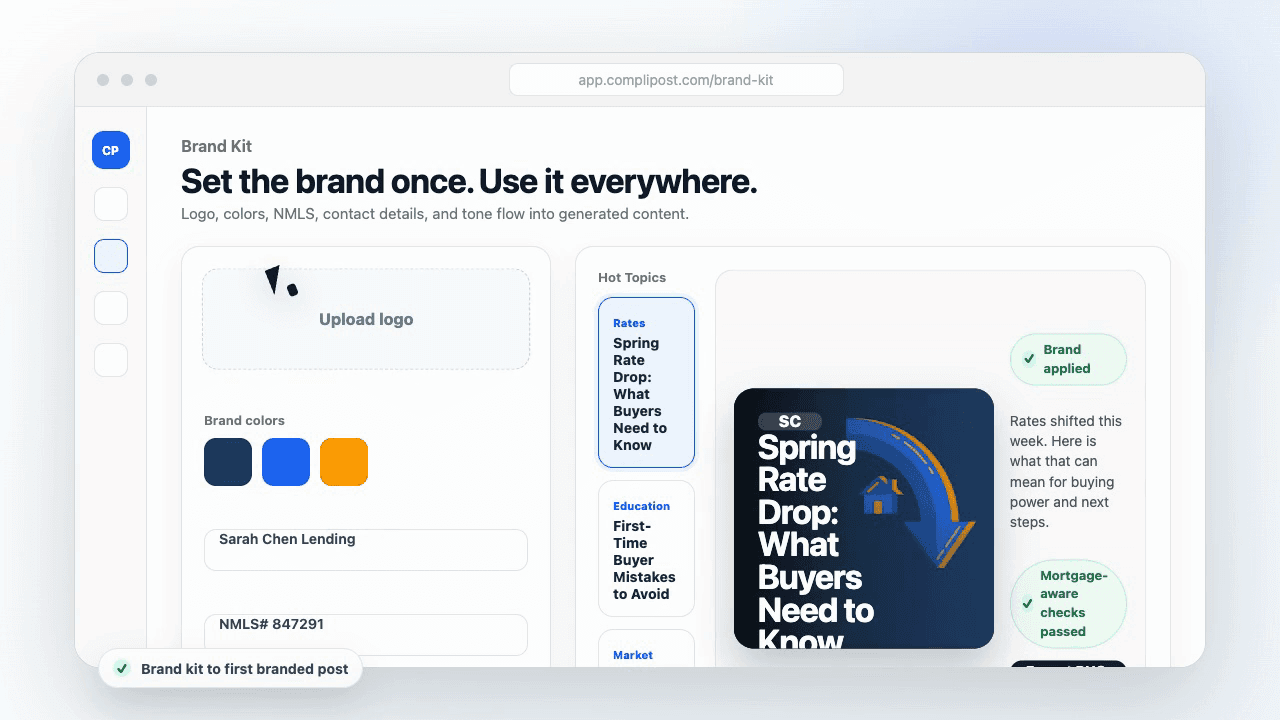
Product workflow
From blank page to export-ready mortgage content
- Start with a borrower topic
- Generate copy and a visual direction
- Review, save, and export the finished asset
These previews reflect the core CompliPost workflow: create, review, save, and export assets for use in your own channels.
Workflow comparison
| Content approach | What happens | Why it matters |
|---|---|---|
| Random posting | One-off ideas created when there is spare time | Inconsistent visibility and weak reuse |
| Template-only posting | Faster design but still requires rewriting and review | Helpful starting point, but not a full system |
| CompliPost workflow | Plan, generate, review, save, and export from one place | Better consistency with mortgage-aware review context |
| Done-for-you service | Someone else creates much of the content | Useful for some teams, but less control and less immediate reuse |
Who this guide helps
This guide is for loan officers working on solo loan officers who need a repeatable mortgage content workflow. The goal is to turn a broad mortgage topic into one borrower question, one useful takeaway, and one asset that can be reviewed before it is shared.
- You need content that sounds like a loan officer, not a generic brand account
- You want examples that can become captions, graphics, GIFs, or PDFs
- You need a clear place to review claims before export
- You want finished work saved for reuse, not lost in a chat thread
A practical workflow for this use case
Start with a narrow scenario, then move through planning, drafting, visual creation, review, and export. For Pinterest for loan officers, that means the topic should be specific enough that a borrower or referral partner can immediately understand what decision the content helps with.
- Choose the borrower type, loan topic, or platform before generating copy
- Draft the caption and visual together so the asset feels cohesive
- Use the federal baseline review aid to flag claims and disclosure gaps
- Export the finished asset and save the post as a reusable starting point
What makes the content stronger
Strong mortgage content is usually specific, plain-spoken, and calm. It explains tradeoffs without pretending one answer fits every borrower. That is especially important on public social channels, where a short post can be interpreted without the full context of a loan conversation.
- Name the borrower question in the first line
- Explain one decision or tradeoff instead of covering everything
- Use examples without implying approval, savings, or rate outcomes
- End with a soft next step, checklist, or guide rather than pressure
Compliance-aware review notes
CompliPost should be treated as a review aid, not a compliance approval system. The public page, generated draft, graphic, and exported asset should all stay honest about that boundary.
- Review specific payment, APR, rate, savings, and qualification language
- Avoid “best,” “lowest,” “guaranteed,” “free,” and urgency claims unless approved
- Check NMLS, Equal Housing, company, and state-specific requirements
- Use company or legal review for anything outside the federal baseline
How this connects to the rest of CompliPost
A focused guide should leave you with a usable next step. After you understand the topic, you can turn it into a calendar slot, a reviewed social post, a downloadable guide, or a platform-specific version for the channel where your audience already spends time.
- Use the content calendar to turn the idea into a weekly plan
- Use the compliance page when claims or disclosures need a slower pass
- Use lead magnets when the topic deserves a deeper PDF guide
- Use platform pages to adapt the same idea for LinkedIn, Facebook, or Instagram
Recommended next steps
Instagram Content for Loan Officers
Build a consistent Instagram presence with compliant mortgage content.
LinkedIn Content for Loan Officers
Professional thought leadership and referral partner content on LinkedIn.
Facebook Content for Loan Officers
Community-building content and local market posts on Facebook.
Mortgage Content Calendar
A structured weekly plan for consistent posting across all platforms.
Examples
FAQ
Is Pinterest worth it for loan officers?+
Yes — and for a reason that applies to no other platform in the mortgage toolkit. Pinterest is a visual search engine. A well-optimized infographic about down payment requirements or the preapproval process can surface in buyer search results for 18 to 24 months after you post it. The effort-to-return ratio is high once you have a library of quality evergreen pins.
What kind of Pinterest content performs best for mortgage loan officers?+
Vertical infographics in a checklist or step-by-step format consistently outperform other formats. Titles like "How much down payment do I really need?" or "5 costs first-time buyers forget" match the phrases buyers actively search. Single-stat graphics and short video pins round out a strong mix. Promotional graphics that lead with your headshot perform poorly — Pinterest rewards content that teaches.
How do I organize Pinterest boards as a loan officer?+
Organize boards the way a buyer thinks, not the way you sell. Create boards for "First-Time Buyer Resources," "Understanding Your Mortgage," "Home Buying Process," and "Mortgage Myths Debunked." Each board becomes a content hub a buyer can binge — they save one pin and scroll through the rest of the board. That depth of engagement is not available on Instagram or LinkedIn.
How often should a loan officer post on Pinterest?+
Three to five pins per week is a sustainable cadence that builds search presence over time. Consistency matters more than volume. Because pins resurface in search for months or years, you are building a compounding library rather than a feed that disappears. Batching a board's worth of content once a month and scheduling it is more effective than posting sporadically.
Can I include mortgage rates in my Pinterest pins?+
It is best to avoid specific rates or APRs in pins entirely. Pinterest content has a long shelf life — a rate quoted today will be outdated in weeks and potentially misleading when buyers find it months later. Specific rates also trigger TILA disclosure requirements that are difficult to satisfy in an image format. Use "current rates vary — get a personalized quote" framing instead.
Will CompliPost post to Pinterest for me?+
No. CompliPost helps you plan content, generate branded infographics and graphics, run a federal-baseline compliance review, and export finished assets. You upload and schedule pins from your own Pinterest account. This keeps you in control of your profile and posting timing.
Create mortgage content with a calmer workflow
CompliPost helps you plan, generate, review, save, and export useful mortgage content without pretending compliance or social distribution is automatic.
Start free