Content format
Mortgage carousel ideas that earn saves and build borrower trust
Carousels are the save-first format on Instagram and LinkedIn. A mortgage carousel works when each slide delivers one clear piece of information, the sequence builds toward a useful conclusion, and slide one is compelling enough to make a borrower swipe.
Why carousels outperform single images for mortgage education
Instagram's algorithm rewards saves more than likes, and carousels earn saves because they teach something a viewer wants to come back to. For loan officers, a five-slide preapproval guide or a seven-slide closing cost breakdown gives a first-time buyer something worth saving to their phone. That save is the algorithm signal that surfaces the post to more buyers.
- Step-by-step processes: preapproval, making an offer, the appraisal process, closing
- Myth correction series: "5 VA loan myths — and the real answer to each"
- Decision frameworks: rent vs. buy, 15-year vs. 30-year, FHA vs. conventional
- Checklists: documents to gather, questions to ask, things to do 90 days before applying
- Comparison tables: loan type features, down payment options by program
Slide-by-slide carousel structure
A well-structured mortgage carousel follows a predictable pattern: slide one hooks with a clear promise, slides two through N-1 deliver on it, and the final slide closes with a soft CTA or saves prompt. Each slide should contain one idea — when a slide tries to say two things, viewers stop swiping. Design for readability: large text, minimal copy per slide, a clear visual hierarchy.
- Slide 1: hook — "The 5 things your preapproval letter actually guarantees"
- Slides 2–5: one thing per slide, short and punchy
- Slide 6: soft CTA — "Save this before your first lender conversation"
Mortgage carousel topics by audience
First-time buyers save step-by-step process carousels. VA borrowers save myth corrections about benefits and funding fees. Self-employed buyers save document checklists. Refinance candidates save comparison frameworks. Matching the carousel topic to a specific buyer question the target audience is already asking is the strongest predictor of save rate.
Compliance in a multi-slide format
Each slide stands alone in a screenshot. A compliance-sensitive claim on slide three is still visible if someone screenshots only that slide. Review every slide individually, not just the caption. Payment comparisons, rate examples, and qualification statements need careful framing on every slide they appear.
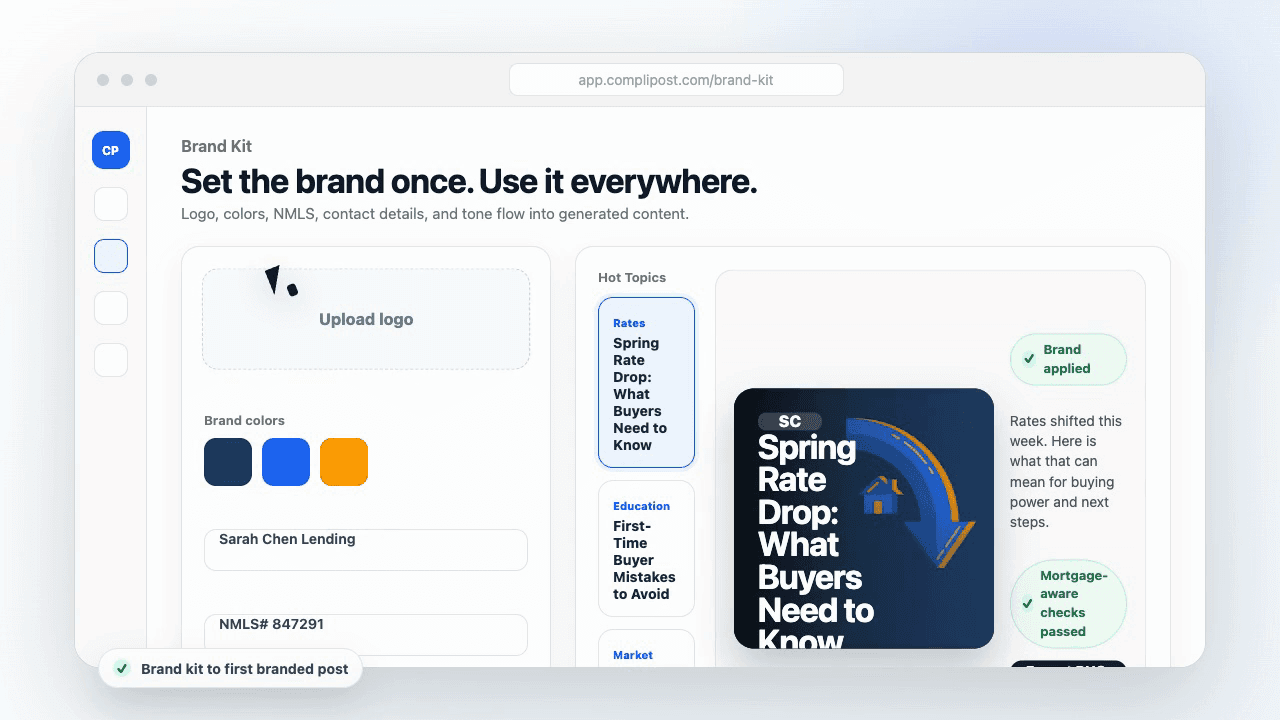
Product workflow
From blank page to export-ready mortgage content
- Start with a borrower topic
- Generate copy and a visual direction
- Review, save, and export the finished asset
These previews reflect the core CompliPost workflow: create, review, save, and export assets for use in your own channels.
Workflow comparison
| Content approach | What happens | Why it matters |
|---|---|---|
| Random posting | One-off ideas created when there is spare time | Inconsistent visibility and weak reuse |
| Template-only posting | Faster design but still requires rewriting and review | Helpful starting point, but not a full system |
| CompliPost workflow | Plan, generate, review, save, and export from one place | Better consistency with mortgage-aware review context |
| Done-for-you service | Someone else creates much of the content | Useful for some teams, but less control and less immediate reuse |
Who this guide helps
This guide is for loan officers working on solo loan officers who need a repeatable mortgage content workflow. The goal is to turn a broad mortgage topic into one borrower question, one useful takeaway, and one asset that can be reviewed before it is shared.
- You need content that sounds like a loan officer, not a generic brand account
- You want examples that can become captions, graphics, GIFs, or PDFs
- You need a clear place to review claims before export
- You want finished work saved for reuse, not lost in a chat thread
A practical workflow for this use case
Start with a narrow scenario, then move through planning, drafting, visual creation, review, and export. For mortgage carousel ideas, that means the topic should be specific enough that a borrower or referral partner can immediately understand what decision the content helps with.
- Choose the borrower type, loan topic, or platform before generating copy
- Draft the caption and visual together so the asset feels cohesive
- Use the federal baseline review aid to flag claims and disclosure gaps
- Export the finished asset and save the post as a reusable starting point
What makes the content stronger
Strong mortgage content is usually specific, plain-spoken, and calm. It explains tradeoffs without pretending one answer fits every borrower. That is especially important on public social channels, where a short post can be interpreted without the full context of a loan conversation.
- Name the borrower question in the first line
- Explain one decision or tradeoff instead of covering everything
- Use examples without implying approval, savings, or rate outcomes
- End with a soft next step, checklist, or guide rather than pressure
Compliance-aware review notes
CompliPost should be treated as a review aid, not a compliance approval system. The public page, generated draft, graphic, and exported asset should all stay honest about that boundary.
- Review specific payment, APR, rate, savings, and qualification language
- Avoid “best,” “lowest,” “guaranteed,” “free,” and urgency claims unless approved
- Check NMLS, Equal Housing, company, and state-specific requirements
- Use company or legal review for anything outside the federal baseline
How this connects to the rest of CompliPost
A focused guide should leave you with a usable next step. After you understand the topic, you can turn it into a calendar slot, a reviewed social post, a downloadable guide, or a platform-specific version for the channel where your audience already spends time.
- Use the content calendar to turn the idea into a weekly plan
- Use the compliance page when claims or disclosures need a slower pass
- Use lead magnets when the topic deserves a deeper PDF guide
- Use platform pages to adapt the same idea for LinkedIn, Facebook, or Instagram
Recommended next steps
Instagram content hub
Create visual mortgage education for carousels, reels, and stories.
Mortgage reel ideas
Pair save-earning carousels with Reels that get reach.
Instagram captions for loan officers
Write the caption that earns the first swipe on your carousel.
Loan officer lead magnets
Turn your best carousel topic into a branded PDF lead magnet.
Examples
FAQ
How many slides should a mortgage carousel have?+
Five to eight slides is the optimal range for most mortgage carousels. Fewer than five often does not deliver enough value to earn a save. More than ten risks losing viewers before the final CTA slide. The best-performing mortgage carousels tend to be six to seven slides.
What should the first slide of a mortgage carousel say?+
A clear promise that tells the viewer exactly what they will learn if they swipe. "5 down payment myths — and the truth behind each" outperforms "Down payment tips for buyers" because it is specific about what the viewer gets. The first slide is the headline; design it to earn the first swipe.
Do carousels work on LinkedIn for loan officers?+
Yes. LinkedIn carousels (posted as PDFs or native documents) perform well for professional mortgage education: process explainers, market context guides, and frameworks referral partners might share with clients. LinkedIn carousels tend to get more views than static posts because LinkedIn's algorithm surfaces interactive content more widely.
Should every carousel end with a CTA?+
Yes, but match the CTA to the post's intent. Educational carousels close best with "Save this" or "Share with someone buying soon." Lead magnet carousels can close with "Comment GUIDE for the full PDF version." Hard sales CTAs ("Call me today") perform poorly as carousel closes.
Can CompliPost create mortgage carousel content?+
Yes. CompliPost generates the copy for each slide in your carousel, applies your brand kit to the visual layout, and runs a federal-baseline review aid across all slides before export.
Create mortgage content with a calmer workflow
CompliPost helps you plan, generate, review, save, and export useful mortgage content without pretending compliance or social distribution is automatic.
Start free